The short answer
Not all dashcams are the same.
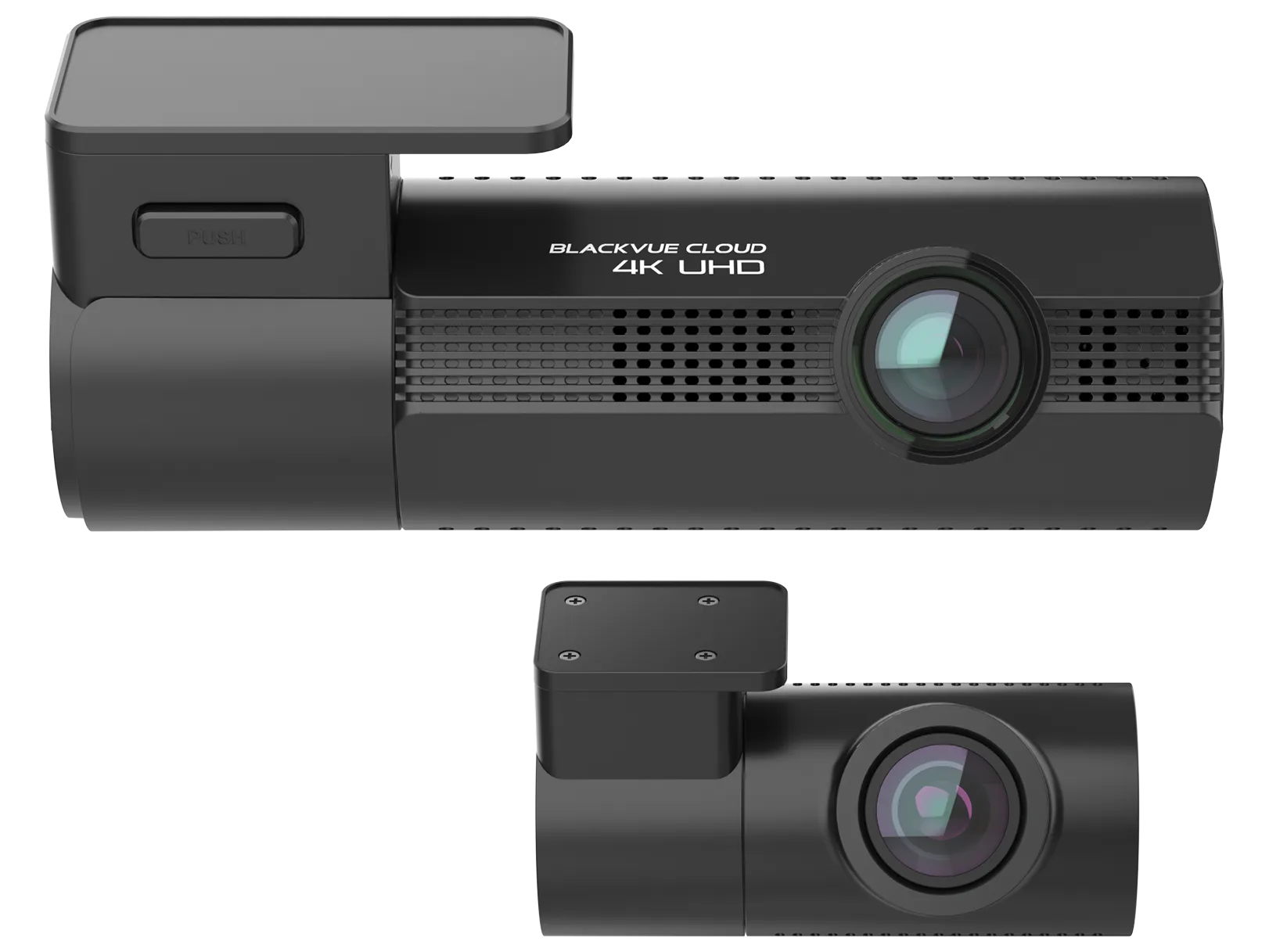
Some cameras are basic windshield recorders. Others are built for better video quality, front and rear coverage, parking mode, impact detection, app access, cleaner installation, and better daily usability.
The right dashcam depends on what you want it to do.
If you only want simple forward recording while driving, your needs are different from someone who wants parking protection, rear coverage, app access, and better documentation for a high-value vehicle, work truck, family SUV, or daily driver.
At Kickin’ Customs in Raynham, MA, we install dashcams for customers across Massachusetts and Rhode Island who want clean installation and practical protection for daily driving, parking incidents, accidents, hit-and-runs, work vehicles, luxury vehicles, EVs, and performance cars.
A dashcam is only useful if it captures the footage you need, stores it properly, and lets you access it when something happens.
Video quality and coverage
Video Quality
Video quality is one of the most important dashcam features.
The whole point of a dashcam is documentation. If the footage is blurry, dark, washed out, shaky, or hard to review, the camera may not help much when you need it.
Good video quality can help show traffic lights, lane position, vehicle movement, road conditions, weather, pedestrians, cyclists, and surrounding traffic.
It may also help capture license plates depending on distance, lighting, speed, glare, glass condition, and camera angle.
No dashcam can guarantee perfect plate capture in every situation.
But better video quality gives you a better chance of useful footage.
Resolution Matters, But It Is Not Everything
Many customers focus only on resolution.
Higher resolution can help, but it is not the only thing that matters.
A dashcam also needs good image processing, proper exposure, low-light performance, stable recording, and a clear view through the windshield.
A high-resolution camera with poor night performance may still struggle.
A camera mounted poorly may miss important details.
A dirty windshield can reduce footage quality.
A low-quality memory card can create recording issues.
Resolution matters, but the full system matters more.
Night Recording
Night recording is extremely important.
Many accidents and parking incidents happen after dark. In New England, this matters even more because winter days are short and many people drive before sunrise or after sunset.
A dashcam should be able to record usable footage in low light, headlights, streetlights, parking lots, garages, and rainy conditions.
Night footage can be challenging because of glare, reflections, headlight bloom, tinted glass, dirty windows, and fast-moving vehicles.
A better camera gives you a better chance of capturing usable footage when lighting is not ideal.
If you drive or park outside at night, night recording should be a priority.
Front Coverage
A front dashcam records what happens ahead of the vehicle.
This is the most common dashcam view and one of the most useful.
The front camera can help document forward accidents, lane changes, red-light situations, sudden stops, road rage, unsafe drivers, pedestrians, cyclists, and general driving events.
For many customers, a front dashcam is the starting point.
It is much better than having no footage.
If your main concern is documenting what happens while driving, front coverage is important.
Rear Coverage
Rear coverage is one of the most valuable upgrades.
A rear dashcam records what happens behind the vehicle. This can help with rear-end accidents, tailgating, parking lot incidents, hit-and-runs, and aggressive drivers behind you.
Many important events happen behind the vehicle.
A front-only camera may show your vehicle moving from an impact, but it may not show who hit you from behind.
A front and rear setup gives you a better view of the full story.
For daily drivers, family vehicles, work trucks, SUVs, luxury vehicles, EVs, and performance cars, rear coverage is usually worth considering.
Parking, events and storage
Parking Mode
Parking mode is one of the most important dashcam features for vehicles parked outside or in public lots.
A dashcam without parking mode is mostly useful while driving.
A dashcam with parking mode can monitor for certain events while the vehicle is parked, depending on the camera, power setup, settings, storage, and installation.
Parking mode may help capture incidents like hit-and-runs, parking lot bumps, vandalism, door impacts, suspicious activity, or movement near the vehicle.
This is useful at work, apartments, schools, gyms, restaurants, shopping centers, hotels, garages, and driveways.
If parking damage is one of your concerns, parking mode matters.
Impact Detection
Impact detection helps the dashcam recognize when the vehicle has been hit or bumped.
Depending on the system, impact detection may save the footage as an event so it is easier to find later.
This is useful for accidents, parking lot impacts, hit-and-runs, vandalism, and certain road incidents.
Impact detection is not perfect.
The sensitivity has to be set correctly. Too sensitive and it may save too many false events. Not sensitive enough and it may miss lighter impacts.
Proper setup matters.
Impact detection is especially valuable when paired with parking mode.
Motion Detection
Some dashcams can record based on motion around the vehicle.
Motion detection can be useful in parking mode, but it depends on the camera, placement, settings, and environment.
In a busy parking lot, motion recording may capture a lot of activity.
In a quiet driveway, it may help capture someone approaching the vehicle.
Motion detection can be helpful, but it should not be the only feature you rely on. Impact detection, parking mode setup, storage, and camera coverage all matter too.
A good dashcam setup balances recording sensitivity with practical storage use.
Storage Capacity
Storage matters more than many customers realize.
Dashcams record continuously, then overwrite older footage through loop recording. The size and quality of the memory card affect how much footage can be stored before it is overwritten.
A front and rear dashcam system records more data than a front-only camera.
Parking mode can also create more saved clips.
If storage is too small, footage may be overwritten sooner than expected.
If the memory card is poor quality, it may fail or record unreliably.
A dashcam is only useful if the footage is actually saved when you need it.
Loop Recording
Loop recording means the dashcam continuously records and overwrites older footage when the storage card fills up.
This allows the camera to keep recording without needing the owner to manually delete files constantly.
Loop recording is useful, but it also means important footage should be saved quickly after an incident.
If you wait too long, the footage may be overwritten.
Event files may be protected from normal overwriting depending on the camera and settings, but storage still has limits.
Owners should understand how their camera saves footage and how to retrieve it.
Event Recording
Event recording saves clips when the camera detects something important.
This may happen during an impact, hard braking, collision, parking mode event, or manual save depending on the dashcam.
Event recording is helpful because it makes footage easier to find later.
Instead of searching through hours of driving video, the owner can look for saved events.
This is especially useful after accidents or parking incidents.
The key is understanding how the camera defines an event and where the clip is stored.
Access, installation and power
App Access
App access can make a dashcam much easier to use.
With app access, the owner may be able to view footage, download clips, adjust settings, and check saved events from a smartphone depending on the camera.
This is important because many customers never want to remove a memory card and plug it into a computer.
If footage is hard to access, the dashcam becomes less useful.
App access makes it easier to review and save footage quickly after an incident.
For daily drivers, family vehicles, and work vehicles, this is a major convenience feature.
Easy Footage Retrieval
The best dashcam is not only the one that records well.
It also needs to let you retrieve footage easily.
After an accident or parking incident, you may be stressed, rushed, or trying to collect information quickly.
You do not want to be guessing how the camera works.
A good dashcam setup should make it clear how to access footage, save clips, and share files when needed.
Customer training matters.
At Kickin’ Customs, we want customers to know how to use the system before they actually need it.
Clean Installation
Clean installation is one of the most important features, even though it is not always listed on the box.
A dashcam should not have wires hanging across the windshield, dashboard, pillars, or console.
A clean installation hides the wiring, places the camera properly, and makes the system feel like it belongs in the vehicle.
This matters on every vehicle, but especially on luxury vehicles, EVs, high-trim trucks, family SUVs, and performance cars.
A dashcam should protect the vehicle without making the interior look cluttered.
Professional installation makes a major difference.
Hardwired Installation
A hardwired dashcam installation connects the dashcam to the vehicle’s power system instead of relying on a visible plug.
Hardwiring creates a cleaner look and can allow parking mode functionality depending on the camera and setup.
A proper hardwire install should consider constant power, ignition power, fuse locations, battery protection, parking mode settings, and vehicle-specific wiring.
This is not something that should be rushed.
Hardwiring is especially important for customers who want parking mode.
The camera needs to be powered properly to monitor while parked.
Battery Protection
Battery protection is critical for parking mode.
A dashcam that records while parked uses power. If it is not set up correctly, it could drain the vehicle battery too far.
Many dashcam systems include voltage cutoff or parking mode settings that shut the camera down before the battery gets too low.
This helps balance protection and reliability.
The goal is to record useful events without leaving the owner with a dead battery.
Battery protection settings should be part of the installation and customer explanation.
Camera Placement
Camera placement matters because the dashcam needs a clear view.
The front camera should be mounted high enough to capture the road clearly, but not in a way that blocks the driver’s view.
The rear camera should be placed where it can record behind the vehicle effectively.
Modern vehicles can have rain sensors, factory cameras, mirror housings, radar systems, driver assistance hardware, tint, defroster lines, wipers, and glass shapes that affect placement.
A professional installer can position the camera so it records well and looks clean.
Windshield and Glass Condition
The dashcam records through glass, so glass condition matters.
A dirty windshield, heavy glare, cracked glass, wiper streaks, tint, reflections, or heavy water spots can affect footage quality.
Even a great dashcam can struggle if the glass is dirty or the camera view is blocked.
Owners should keep the glass clean around the camera area.
This is especially important for night recording, rain, snow, and glare.
A dashcam works best when it has a clear view.
Front and Rear Camera Wiring
Front and rear dashcam systems require more wiring than front-only systems.
The rear camera cable usually needs to be routed from the front camera area to the rear of the vehicle.
This should be done cleanly and carefully.
Poor wiring can look bad, interfere with trim, create rattles, or cause reliability issues.
On SUVs, hatchbacks, trucks, EVs, and luxury vehicles, rear camera wiring requires extra attention because rear glass and liftgate layouts vary.
Clean routing is a major reason to choose professional installation.
Parking Mode Power Management
Parking mode should be set up with realistic expectations.
Some customers think parking mode means the dashcam records everything forever.
That is not how it works.
Parking mode depends on battery voltage, recording settings, storage capacity, event triggers, and how long the vehicle sits.
A vehicle parked for hours may record differently than a vehicle parked for days.
The system should be configured to balance recording usefulness with battery safety.
This is another reason professional setup matters.
Controls, reliability and connectivity
Audio Recording
Some dashcams include audio recording.
Audio can be useful in certain situations, such as road rage, conversations after an accident, horn use, or sounds around the vehicle.
But audio recording also raises privacy considerations.
Owners should understand whether audio is enabled, how it works, and whether they want it on.
For work vehicles or shared vehicles, expectations should be clear.
Audio can be useful, but it should be used thoughtfully.
Screen vs No Screen
Some dashcams have built-in screens.
Others are screenless and controlled through an app.
A built-in screen can make quick viewing easier, but it can also make the camera larger and more visible.
A screenless camera can look cleaner and more discreet, but app access becomes more important.
The better choice depends on the customer.
Many modern customers prefer a clean camera with app access because it keeps the installation tidy and reduces interior clutter.
Discreet Design
A good dashcam should not be distracting.
Large, bulky cameras can draw attention or block visibility.
A discreet camera can sit near the mirror area and blend into the interior better.
This is especially important on luxury vehicles, EVs, performance cars, and new vehicles where the owner cares about the interior.
Discreet design also helps reduce the chance of the camera itself becoming a target.
The dashcam should be visible enough to work, but not so obvious that it ruins the cabin.
Reliability
Reliability is one of the most important dashcam features.
A dashcam needs to record consistently.
It needs to power on correctly.
It needs to save footage properly.
It needs to handle heat, cold, vibration, daily use, and storage cycles.
A cheap dashcam that fails when needed is not a good value.
Reliability comes from the camera quality, memory card quality, installation, settings, and customer understanding.
The best dashcam setup is the one that works quietly in the background.
Heat and Cold Performance
Vehicles experience extreme temperatures.
In summer, the cabin can become extremely hot.
In winter, the camera may sit in freezing temperatures.
A dashcam needs to handle real vehicle conditions.
This matters in Massachusetts and Rhode Island because the weather changes throughout the year.
A camera that struggles in heat or cold may become unreliable.
Choosing a quality dashcam and installing it properly helps improve long-term performance.
Memory Card Quality
The memory card is a critical part of the dashcam system.
Dashcams write footage constantly, which is harder on memory cards than normal phone or camera use.
A low-quality card may fail, corrupt footage, or stop recording properly.
Using the right type of memory card matters.
Customers should also understand that memory cards do not last forever and may need replacement over time.
A dashcam system should be checked occasionally to make sure it is still recording properly.
App Notifications
Some dashcams or connected systems can provide notifications depending on the model and setup.
Notifications may alert the owner to events, impacts, or saved clips.
This can be useful, but it depends on the system.
Customers should understand what alerts are included, how they work, and whether they depend on the phone, app, Wi-Fi, cloud service, or other features.
Not every dashcam has the same alert capability.
If notifications matter, that should be discussed before choosing a model.
Cloud Features
Some dashcams include cloud-connected features depending on the model, plan, and connection.
Cloud features may allow remote viewing, alerts, uploads, or other connected functions.
These features can be useful, but they may require service, hotspot connection, subscription plans, or additional hardware.
Not every customer needs cloud features.
For many drivers, local recording with app access is enough.
For work vehicles, fleet vehicles, or higher-risk vehicles, cloud features may be worth discussing if available.
GPS Data
Some dashcams can record GPS data.
GPS data may show vehicle location, route, or speed depending on the camera and settings.
This can be useful for documentation, but it should be understood clearly.
Some owners want GPS data included.
Others prefer video only.
GPS data can support accident documentation, work vehicle use, and route history depending on the system.
If GPS data matters, it should be discussed when choosing the dashcam.
Security roles and feature selection
Dashcam GPS vs Vehicle GPS Tracking
Dashcam GPS and vehicle GPS tracking are not always the same.
A dashcam with GPS may record location data with the video.
Vehicle GPS tracking, such as DroneMobile GPS, is designed for location awareness, tracking, and theft recovery support.
Dashcam GPS helps with video context.
Vehicle GPS tracking helps you know where the vehicle is.
For high-value vehicles, work trucks, and theft concerns, both can make sense.
They solve different problems.
Dashcam Parking Mode vs Car Alarm
Parking mode and car alarms are different.
A dashcam parking mode records certain events while parked.
A car alarm detects and alerts when sensors are triggered.
The dashcam may help show what happened.
The alarm may help notify you that something happened.
For the strongest parking protection, pairing a dashcam with a Compustar PRO alarm can make sense.
One records.
One reacts.
Together, they are more useful than either one alone.
Dashcam vs IGLA
A dashcam and IGLA do different jobs.
A dashcam records activity.
IGLA helps stop unauthorized driving.
If someone attempts to steal the vehicle, the dashcam may capture part of the activity depending on camera view and parking mode. IGLA helps stop the vehicle from being driven away without authorization.
For theft concerns, a dashcam should not be viewed as a replacement for an immobilizer.
It is a documentation layer.
IGLA is a prevention layer.
Dashcam vs DroneMobile GPS
A dashcam and DroneMobile GPS also do different jobs.
The dashcam records video.
DroneMobile GPS helps show vehicle location if it moves.
If someone hits the vehicle, the dashcam may show the incident.
If the vehicle is stolen or towed, GPS tracking helps with location awareness.
For high-value vehicles, work trucks, daily drivers, and family vehicles, pairing dashcam footage with GPS tracking can create a stronger awareness package.
Best Dashcam Features for Daily Drivers
Daily drivers usually benefit from front and rear coverage, parking mode, impact detection, good night recording, app access, and clean hardwired installation.
Daily drivers are exposed constantly.
They are parked at home, work, school, apartments, gyms, restaurants, shopping centers, hotels, and public lots.
They also spend more time in traffic.
The more often the vehicle is used, the more useful the dashcam becomes.
For daily drivers, ease of use matters as much as camera quality.
Best Dashcam Features for Family Vehicles
Family vehicles usually benefit from front and rear coverage, parking mode, app access, reliable storage, and clean installation.
SUVs, minivans, trucks, and crossovers carry passengers, kids, bags, sports gear, and daily life.
A dashcam can help document accidents, rear-end impacts, parking incidents, and hit-and-runs.
For parents, app access can be useful because footage should be easy to retrieve when needed.
A family vehicle deserves coverage that is simple and reliable.
Best Dashcam Features for Work Trucks
Work trucks usually benefit from front and rear coverage, parking mode, impact detection, strong storage, GPS features, app access, and clean hardwired installation.
A work truck may be on the road all day and parked at job sites, supply houses, customer properties, and work lots.
The dashcam can help document accidents, parking incidents, job site disputes, and hit-and-runs.
Work trucks may also benefit from DroneMobile GPS tracking and alarm systems.
For business owners, dashcams are part of protecting the vehicle and the workday.
Best Dashcam Features for Luxury Vehicles
Luxury vehicles usually benefit from discreet design, clean installation, front and rear coverage, night recording, parking mode, app access, and high-quality footage.
Owners of luxury vehicles usually do not want wires hanging or bulky cameras cluttering the interior.
The installation should look professional.
The camera should record well without being distracting.
For luxury SUVs, sedans, and performance models, a dashcam can be part of a larger protection package with PPF, ceramic tint, coatings, GPS tracking, alarms, and IGLA.
Best Dashcam Features for EVs
EVs usually benefit from clean installation, front and rear coverage, parking mode, app access, and strong low-light performance.
EV owners often care about technology, app access, and clean integration.
They may also park at chargers, work lots, apartments, hotels, garages, and public lots.
A dashcam can help document charging area incidents, parking damage, accidents, and road events.
EVs may also be paired with IGLA, DroneMobile GPS, ceramic tint, PPF, and windshield protection film for a more complete protection package.
Best Dashcam Features for Performance Cars
Performance cars usually benefit from front and rear coverage, strong video quality, night recording, parking mode, impact detection, app access, and discreet installation.
These vehicles attract attention on the road and while parked.
A dashcam can help document aggressive drivers, road rage, parking incidents, accidents, and hit-and-runs.
For performance cars, rear coverage is especially useful because tailgating and road behavior behind the vehicle can matter.
Pairing a dashcam with IGLA, GPS tracking, and alarm sensors can create stronger protection.
Choosing a Dashcam Based on Risk
The right dashcam depends on risk.
If you only want basic forward recording, a front camera may be enough.
If you worry about rear-end accidents, choose front and rear.
If you park outside, choose parking mode.
If you drive at night, prioritize night recording.
If you want easy footage access, choose app access.
If you use the vehicle for work, consider stronger storage and GPS features.
If the vehicle is high-value, choose a cleaner, more complete setup.
A good dashcam setup should be built around how the vehicle is actually used.
What Features Are Less Important?
Some features sound impressive but may not matter as much for every customer.
A huge screen may not be necessary if app access is strong.
Cloud features may not be needed if local storage is enough.
Interior recording may not be useful unless you drive rideshare, fleet, or shared vehicles.
Voice control may be convenient, but not as important as video quality, parking mode, storage, and installation.
The most important features are the ones that help capture and retrieve useful footage when something happens.
Questions to Ask Before Choosing a Dashcam
Before choosing a dashcam, ask:
● Do I want front-only or front and rear coverage?
● Do I park outside?
● Do I want parking mode?
● Do I need good night recording?
● Do I want app access?
● Do I use the vehicle for work?
Is the vehicle high-value?
● Do I worry about hit-and-runs?
● Do I want GPS data?
● Do I want the dashcam paired with an alarm, GPS tracking, or IGLA?
● Do I want a clean hardwired installation?
The answers help narrow down the right system.
Professional Installation Matters
The best dashcam features do not mean much if the camera is installed poorly.
Camera placement matters.
Wiring matters.
Parking mode setup matters.
Battery protection matters.
Storage matters.
App setup matters.
Customer training matters.
At Kickin’ Customs in Raynham, MA, we install dashcams with a focus on clean wiring, proper placement, reliable parking mode setup, and making sure the customer knows how to access footage.
A dashcam should be easy to live with and ready when needed
Final Thoughts
The most important dashcam features are video quality, night recording, front and rear coverage, parking mode, impact detection, storage, app access, clean installation, and battery protection.
The right dashcam depends on how the vehicle is used.
A daily driver may need different features than a work truck. A family SUV may need different coverage than a weekend performance car. A luxury vehicle may need a cleaner and more discreet installation. A vehicle parked outside may need parking mode more than one stored in a garage.
At Kickin’ Customs in Raynham, MA, we install dashcams for customers across Massachusetts and Rhode Island who want reliable footage, cleaner installation, and practical protection.
When something happens, the best dashcam is the one that recorded clearly, saved the clip, and made the footage easy to access.
Frequently Asked Questions
What dashcam features matter most?
The most important dashcam features are video quality, night recording, parking mode, impact detection, storage, app access, front and rear coverage, and clean installation.
Is parking mode worth it on a dashcam?
Yes, parking mode is worth it if your vehicle is parked outside, in public lots, at work, at apartments, at schools, or anywhere parking incidents may happen.
Is front and rear dashcam coverage worth it?
Yes. Front and rear coverage is worth it for many vehicles because it helps document rear-end accidents, tailgating, parking incidents, and hit-and-runs.
Does night recording matter?
Yes. Night recording matters because many accidents, parking incidents, and hit-and-runs happen in low-light conditions.
Does a dashcam need app access?
App access is very useful because it can make it easier to view, save, and download footage from your phone.
Does parking mode drain the battery?
Parking mode uses power, so proper hardwired installation and battery protection settings are important.
Is professional dashcam installation worth it?
Yes. Professional installation helps with clean wiring, camera placement, parking mode setup, battery protection, and customer training.
Can a dashcam replace an alarm or GPS tracker?
No. A dashcam records video. An alarm detects and alerts. GPS tracking helps locate. IGLA helps stop unauthorized driving. They work best as layers.
Plan your next step
Want a dashcam that records clearly, looks clean, and is easy to use when something happens? Contact Kickin’ Customs in Raynham, MA to compare front and rear dashcams, parking mode, app access, GPS tracking, alarms, and layered security options.